Would you like to set custom webhooks to obtain real-time, on-chain data? If so, search no more! With Moralis Streams, you can start monitoring a wide range of on-chain activities with minimum fuss. All it takes is a free Moralis account, which gives you two options to set up custom webhooks. You can do so via a user-friendly UI without any coding or via the Moralis JS SDK. If you’d like to use the SDK, the following snippets of code will do the trick:
import Moralis from ‘moralis’;
import { EvmChain } from “@moralisweb3/common-evm-utils”;
Moralis.start({
apiKey: ‘YOUR_API_KEY’,
});
const stream = {
chains: [EvmChain.ETHEREUM, EvmChain.POLYGON], // List of blockchains to monitor
description: “monitor Bobs wallet”, // Your description
tag: “bob”, // Give it a tag
webhookUrl: “https://YOUR_WEBHOOK_URL”, // Webhook URL to receive events
}
const newStream = await Moralis.Streams.add(stream);
const { id } = newStream.toJSON(); // { id: ‘YOUR_STREAM_ID’, …newStream }
// Now we attach Bobs address to the stream
const address = “0x68b3f12d6e8d85a8d3dbbc15bba9dc5103b888a4”;
await Moralis.Streams.addAddress({ address, id });
The above example focuses on using custom webhooks for crypto wallet tracking. However, there are many other use cases with custom webhooks. Essentially, you can monitor any wallet and smart contract address for a wide range of on-chain activities!
Overview
We will dive straight into the step-by-step instructions on how to set custom webhooks with Moralis Streams in the following section. Now, although the easiest way to set up webhooks is via the admin UI, if you are developing more advanced dapps, it might be better for you to set up custom webhooks via the SDK. Either way, we’ll showcase both options below!
In case you first wish to refresh your understanding of custom webhooks or get better acquainted with Moralis Streams, make sure to check the sections below the tutorial. After all, it’s essential to understand what webhooks are and why they are integral in the realm of Web3 before diving into the world of Moralis Streams and custom webhooks.
Tutorial: How to Create Custom Web3 Webhooks with Moralis Streams
When it comes to using Moralis Streams to create custom webhooks, you have two paths. In case you want to avoid coding when fetching real-time, on-chain notifications, you’ll most likely prefer the admin UI. On the other hand, you may prefer to go about this feat programmatically. In that case, using Moralis’ JS SDK is the right path for you.
The details for these two options are outlined in the subsections below. And while you don’t need to buy custom webhooks when using Streams, you need an active Moralis account.

So, in case you don’t have your Moralis account yet, make sure to set it up now. Simply hit the “Start for Free” button in the top menu bar on any of Moralis’ official pages. Doing so will take you to the Moralis sign-up page, where you just need to enter your name, email, and create your password:
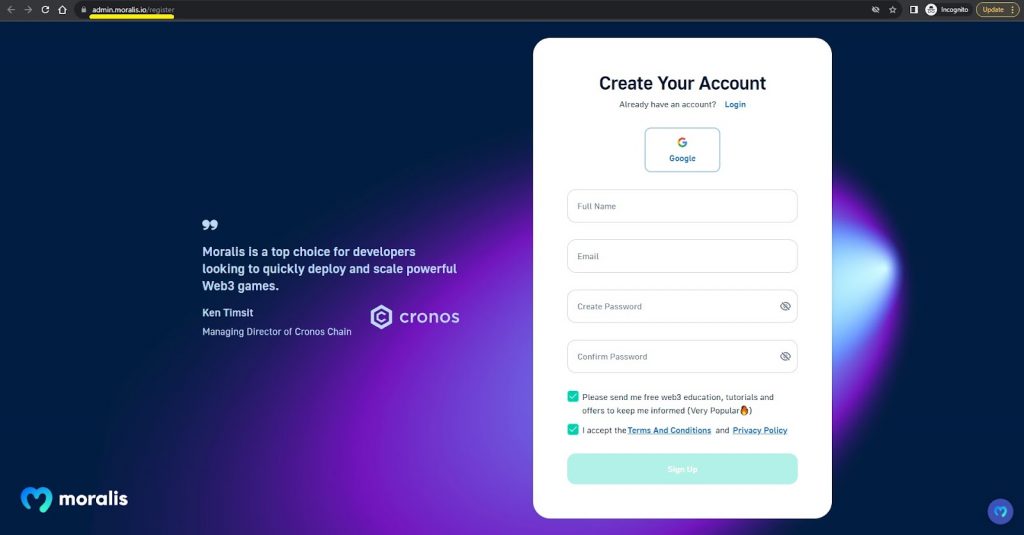
Of course, if you already have your account up and running, simply log in and follow the steps below.
Option 1: Set Up Custom Webhooks via Moralis Admin UI
Visit your Moralis admin panel.Create a new project.Go to the “Streams” page.Create a new stream.Set up a custom stream or use one of the available templates.
The first four steps outlined above are completely straightforward. However, the fifth step includes several substeps and may require some additional explanations. As such, make sure to go through the details below:
Step 1: Visit your Moralis admin panel by logging in to your Moralis account.
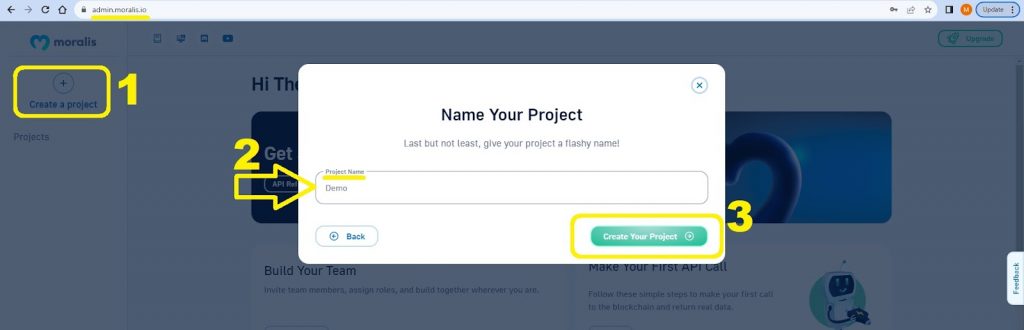
Step 2: Click on the “Create a project” button. The “Name Your Project” frame will pop up by doing so. Enter your project’s name and hit the “Create Your Project” button:
Step 3: After creating your Web3 project, you’ll get to see the left-hand side menu options. According to your mission, you ought to select “Streams”:
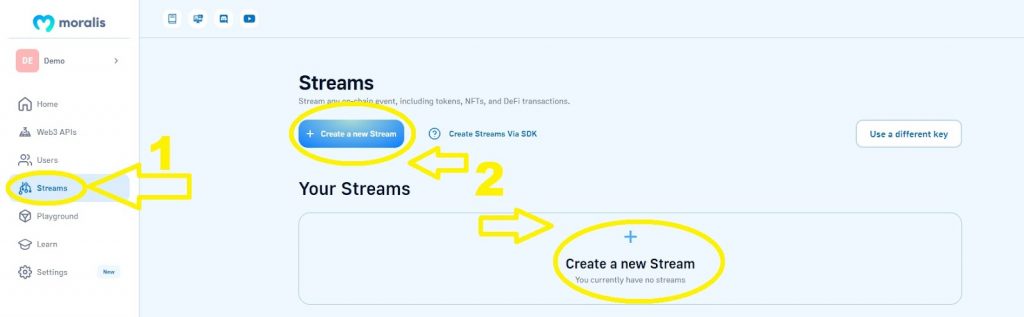
Step 4: As outlined in the above image, the Streams page offers two options to create a new stream. You can click on either of them to proceed.
Step 5: Set Up a Custom Stream or Use One of the Available Templates
After hitting any of the two “Create a new Stream” buttons in step four, you will be looking at the “Create new stream” page:
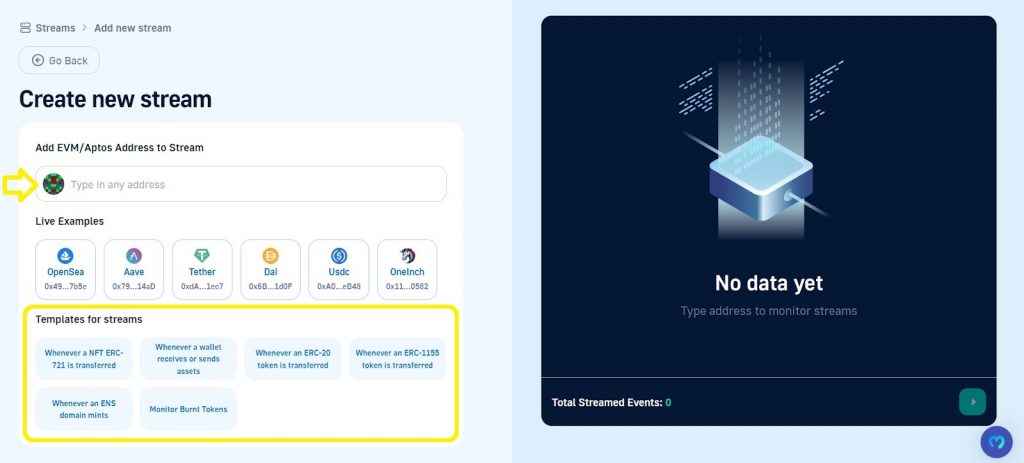
If you wish to create a custom stream, simply enter an EVM/Aptos wallet or smart contract address in the “Type in any address” entry field.
On the other hand, if you prefer to go with one of the templates, just select one of the options offered under “Templates for streams”. At the time of writing, the stream templates allow you to monitor specific NFT (ERC-721 and ERC-1155) and ERC-20 transfers, specific wallets, ENS domain mints, and token burns.
When you click on any of the templates, you will be asked to enter either a wallet address or a smart contract address. Here’s an example of the “Whenever a wallet receives or sends assets” template:
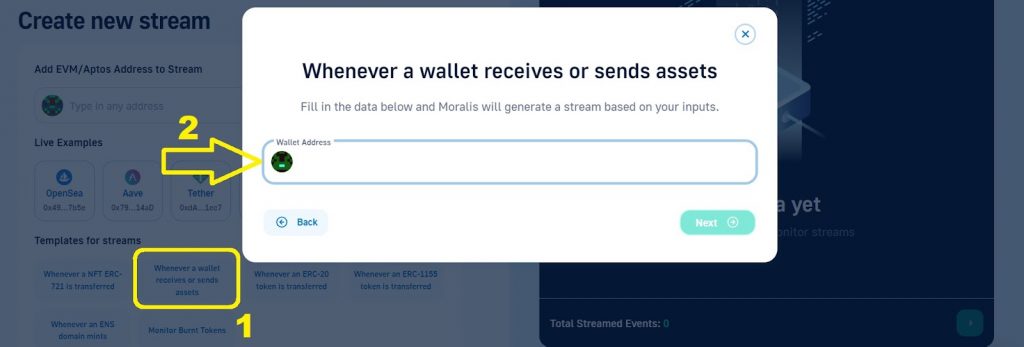
The “Create new stream” page also allows you to explore several live examples. If you wish to do so, simply select one of the options under “Live Examples”.
Nonetheless, whether you take the “custom” or “template” path, once you enter a valid address, you’ll be redirected to the stream setup page. You will land on the same page even if you select any of the live examples.
Here’s an example where we use the “tracking Bob’s wallet”:
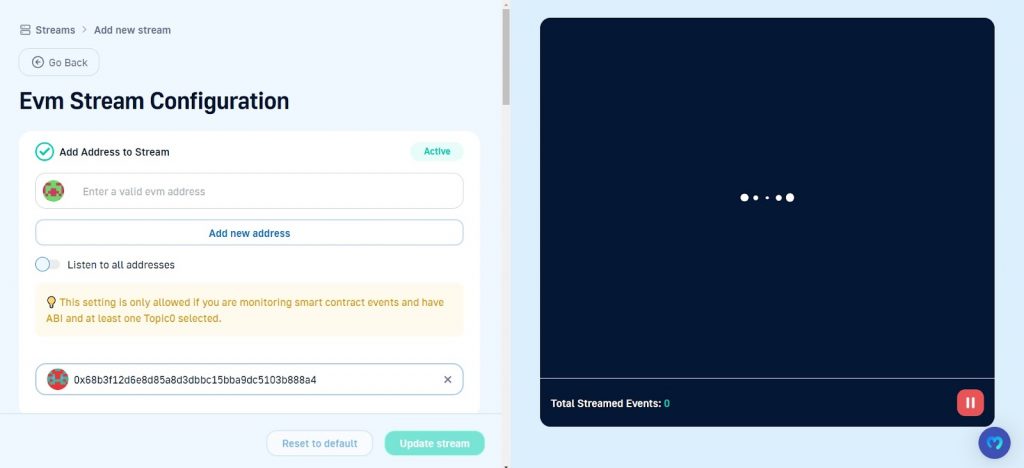
Streams Configuration
The live view on the right-hand side of the page is already doing its thing. As soon as Bob’s wallet sends or receives any crypto, it will show you the details. As for the left-hand side of the “Stream configuration” page, you have additional options.
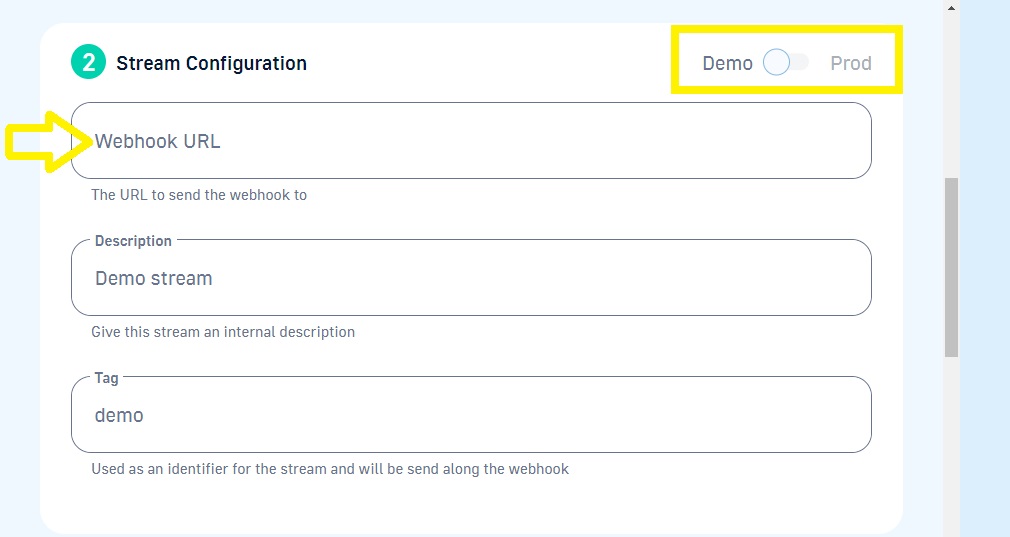
You can add additional addresses to monitor. You even have the “Listen to all addresses” toggle available for specific ABI topics. Also, scrolling down, you can see that your stream configuration allows you to set your custom webhook URL, your stream’s description, and its tag:
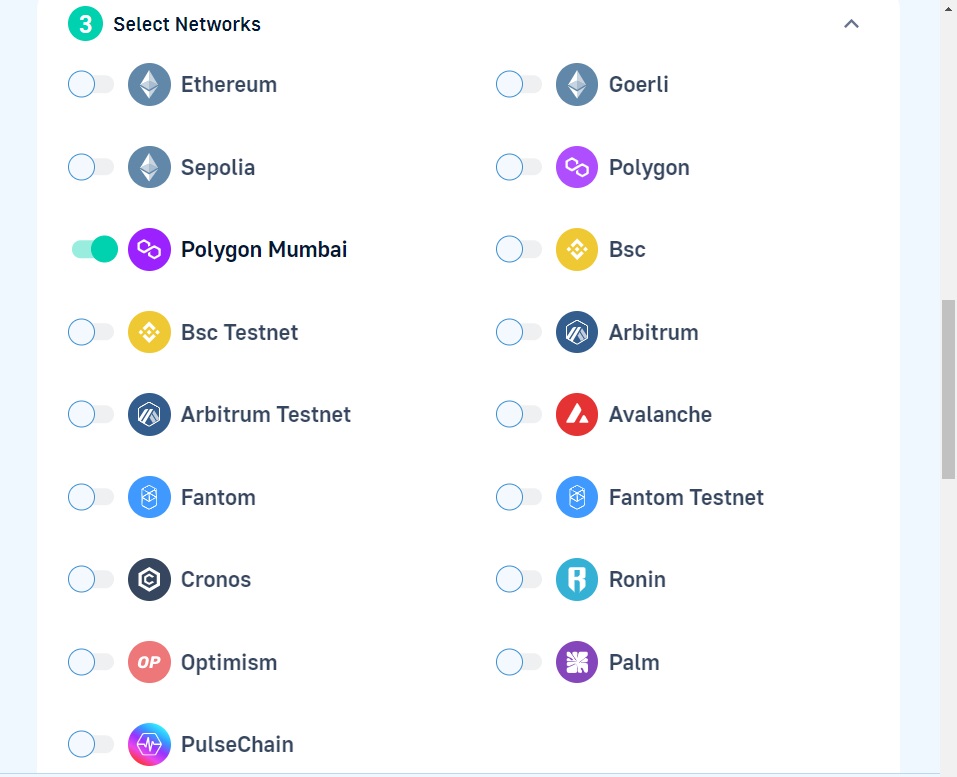
Next, you get to select the networks you want to focus on:
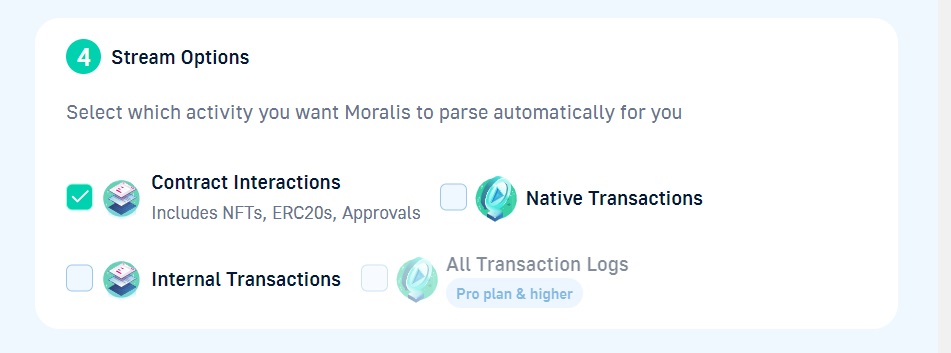
Then, you get to define which type of on-chain activity you want to monitor:
You also have advanced options, where you get to input a smart contract’s ABI and select specific topics:
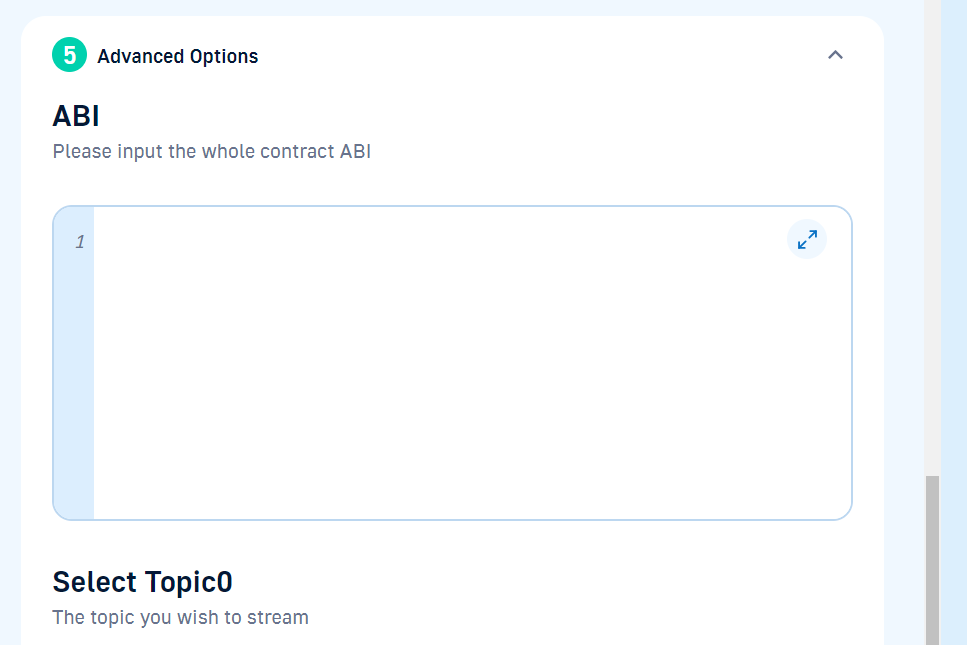
Finally, you can also choose specific triggers that allow you to run read-only smart contract functions:
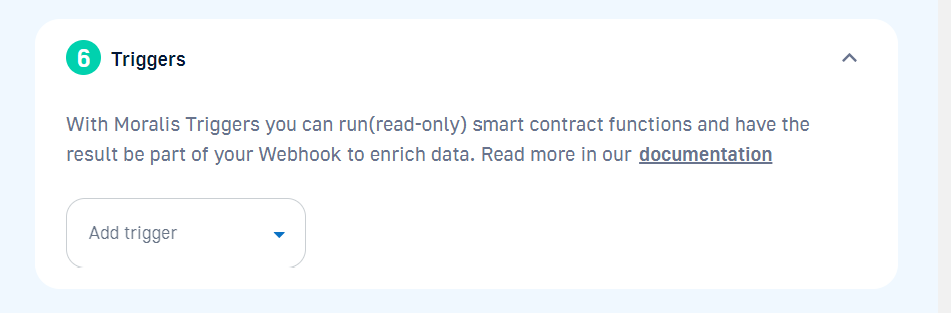
Note: In case you make any changes to your stream setup, make sure to hit the “Update stream” button. Moreover, for detailed instructions regarding all available Streams API configurations, check out the Streams API documentation. This is the place to learn how far you can go without buying custom webhooks!
Option 2: Setting Up Custom Webhooks Programmatically
Setting up a Web3 webhook programmatically with Moralis may not be as simple as using the admin UI, but it is still pretty straightforward. Here’s a step-by-step guide you need to follow in that case:
Launch your favorite integrated development environment (IDE) and create a new project with a JavaScript (JS) file.Install all Moralis dependencies, which can be done by running npm install moralis if you’re using NodeJS.Initialize the Moralis SDK with your API key, which you can obtain from the Moralis admin panel (the Settings page of your project). These are the lines of code that will initialize the Moralis SDK:import Moralis from ‘moralis’;
import { EvmChain } from “@moralisweb3/common-evm-utils”;
Moralis.start({
apiKey: ‘YOUR_API_KEY’,
}); Create a stream object by specifying the chains you want to monitor, providing a description, adding a tag, and defining your webhookUrl. Following the example in the intro, these snippets of code focus on tracking a Web3 wallet’s activity. const stream = {
chains: [EvmChain.ETHEREUM, EvmChain.POLYGON], // List of blockchains to monitor
description: “monitor Bobs wallet”, // Your description
tag: “bob”, // Give it a tag
webhookUrl: “https://YOUR_WEBHOOK_URL”, // Webhook URL to receive events
} Pass the stream object as a parameter when calling Moralis’ Moralis.Streams.add(stream) function. You also need to add the address you want to monitor. Here’s the solution for our example: const newStream = await Moralis.Streams.add(stream);
const { id } = newStream.toJSON(); // { id: ‘YOUR_STREAM_ID’, …newStream }
// Now we attach Bob’s address to the stream
const address = “0x68b3f12d6e8d85a8d3dbbc15bba9dc5103b888a4”;
await Moralis.Streams.addAddress({ address, id });
As you can see, steps four and five of setting up custom webhooks via code cover the same aspects as outlined in the “admin UI” path.
Note: If you need further assistance with any of the above steps, make sure to dive into Moralis’ documentation. There, you can also find detailed instructions on how to get going with Moralis, how to create Express servers to obtain webhook URLs and much more.
What are Custom Webhooks?
Custom webhooks are webhooks that users/devs can set up according to their specific needs. As such, the “custom” part is quite clear. However, let’s also introduce some clarity regarding “webhooks”.
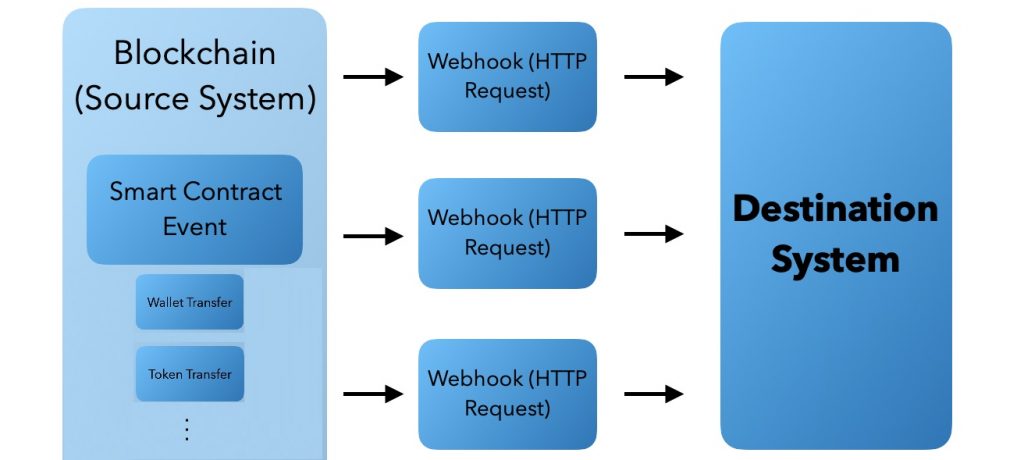
Webhooks are HTTP requests triggered by specific events in a source system, which are then sent to a destination system. They serve as a seamless means of communication between different systems, allowing them to share data effectively. In the context of Web3, webhooks play a vital role in enabling cross-system communication and real-time data sharing.
In the decentralized world of Web3, where blockchain systems operate autonomously, webhooks facilitate the transfer of data when on-chain events occur. This is particularly important for dapp developers and enthusiasts who want to monitor and listen to real-time blockchain activity.
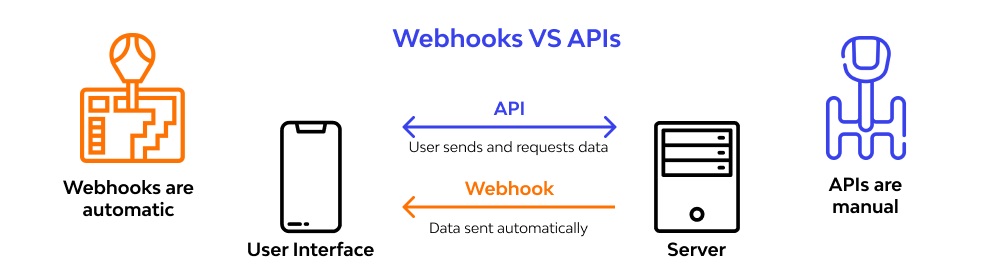
So, with custom Web3 webhooks, you can set up personalized event triggers that align with your specific interests and requirements. Instead of manually monitoring databases and checking for state changes, custom webhooks automatically notify you when events of interest occur. Moreover, they automatically deliver request payloads to your destination system.
Real-Time Custom Webhook Alerts for On-Chain Events
Moralis Streams empowers users to set up real-time alerts for Web3 events using custom webhooks. These alerts cover a wide range of events, including NFT transfers, DeFi transactions, smart contract interactions, and much more. With Moralis Streams, you can customize your alerts to focus on events that matter the most to you and your dapps without the need to buy custom webhooks separately.
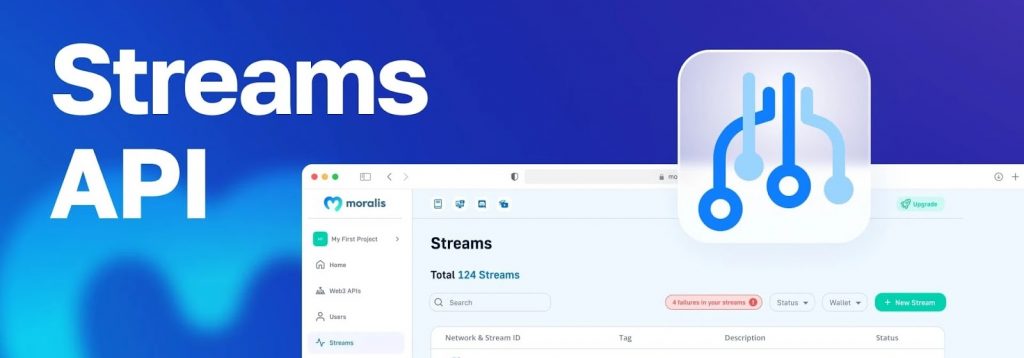
Essentially, Moralis Streams make accessing and utilizing Web3 real-time data as straightforward as possible.
Streamlining User Engagement
One of the standout features of Moralis Streams is its ability to maximize user engagement with real-time notifications. For users or wallet holders, staying updated with on-chain events is crucial. The Streams tool allows you to set filters that monitor relevant events, including changes in user holdings, the latest token transfers, NFT activities, DeFi contract events, and more. This real-time notification system keeps you ahead of the competition, providing seamless updates tailored to your user base.
Fast-Track Access to Smart Contract Events
Moralis Streams simplifies the process of tracking specific smart contracts and on-chain events. Rather than wrestling with complex data pipelines and the intricacies of running RPC nodes, Moralis Streams provides an efficient solution. You can input the contracts of interest, add its ABI, and set up custom data filters for topics and metadata to receive the exact events, addresses, interactions, and internal transactions you need.
The Versatility of Moralis Streams
Moralis Streams is renowned for its flexibility and customization options. It’s the industry’s most adaptable real-time custom webhook solution for blockchain data. This allows you to set up streams for any custom Web3 use case you can imagine.
The main benefits of Streams include:
Accelerated Time-to-Market – Monitoring, ingesting, indexing, and tailoring real-time blockchain data can be time-consuming and expensive. With Moralis Streams, you can expedite your time-to-market, saving both time and money.Scalability at Its Best – Moralis Streams offers unmatched scalability. For instance, you can effortlessly listen to the millions of most active Ethereum wallets with a single stream. This scalability ensures you can cater to a broad audience and various use cases without compromising performance.Cross-Chain Interoperability – Moralis Streams supports a wide array of blockchain networks, including Ethereum, Polygon, BNB Chain, and many others. Thus, it gives you the freedom to receive custom webhooks on almost any network or layer-2 solution.
Note: In case you are still stuck using ethers.js, make sure to check out our ethers.js vs Web3 streams comparison.
Custom Webhooks – Key Takeaways
You don’t have to buy custom webhooks when you use Moralis Streams.With the Streams API, you can set custom webhooks in two simple ways: using Moralis’ admin UI and programmatically with the Moralis SDK.Web3 webhooks are powerful shortcuts that give users/devs access to real-time, on-chain data without dealing with the complexities of blockchains.Moralis Streams are the ultimate solution when it comes to Web3 webhooks.
So, before you go and buy custom webhooks, make sure to take Moralis Streams for a spin! Who knows, perhaps you’ll even be able to cover all your Web3 webhook needs with a free account. If not, you can easily upgrade to a Pro or Business account at any time. Also, note that Streams are just one of many other powerful Web3 APIs that Moralis offers. Some of the most popular ones include the NFT API, Token API, Market Data API, Price API, and Auth API.
In addition, if you wish to learn more about dapp development, make sure to explore the Moralis blog. Some of the latest articles there cover the fastest way to get prices of crypto, the ultimate guide to NFT marketplace development, how to use the getLogs method, the best Web3 market data API, and much more.
You should also consider taking a more professional approach to jour Web3 education by enrolling in Moralis Academy.