Closely monitoring NFT sales is essential in order to make informed decisions. However, as many of you know, it can be quite challenging to monitor such data 24/7 manually. Fortunately, thanks to Moralis Streams, you no longer have to! With this tool, developers can easily set up NFT sales notifications in a heartbeat and get real-time updates automatically! So, if you want to know how to set up NFT sales notifications, follow along as we explore the entire process of doing so. For a sneak peek, here’s an example of how to use Moralis Streams:
import Moralis from ‘moralis’;
import { EvmChain } from “@moralisweb3/common-evm-utils”;
Moralis.start({
apiKey: ‘YOUR_API_KEY’,
});
const stream = {
chains: [EvmChain.ETHEREUM], // List of blockchains to monitor
description: “monitor CoolCats NFT”, // Your description
tag: “CoolCatsNFT”, // Give it a tag
webhookUrl: “https://YOUR_WEBHOOK_URL”, // Webhook URL to receive events
}
const newStream = await Moralis.Streams.add(stream);
const { id } = newStream.toJSON(); // { id: ‘YOUR_STREAM_ID’, …newStream }
// Now we attach CoolCat NFT contract address to the stream
const address = “0x1A92f7381B9F03921564a437210bB9396471050C”;
await Moralis.Streams.addAddress({ address, id });
If you worked with Moralis before, you know exactly how to implement the above lines of code. However, if this is the first rodeo with Moralis and the Streams API, you should dive into the following sections. Aside from learning how to set up NFT sales notifications programmatically, we’ll also show you how to do it using a user-friendly admin UI.
Overview
Moving forward, you’ll first learn about the importance of NFT sales notifications and why your project should include that feature. Next, we’ll focus on the “how-to” part. However, before diving into today’s tutorial, we’ll ensure you get acquainted with the best tools for setting up NFT sales notifications. As such, you’ll learn the gist of Streams API and NFT API. The former is the go-to tool for real-time, on-chain notifications, and the latter is the ultimate tool for building NFT-related dapps.
In addition, we’ll lay out the steps to set up NFT sales notifications programmatically as well as via Moralis’ admin UI. Finally, we’ll also cover some popular use cases where NFT sales notifications make the most sense.
NFT Sales and Notifications
When developing an NFT project, you should provide users with engaging and timely stats and updates. For example, anyone using an NFT marketplace will expect real-time push notification updates on, let’s say, their NFT sales and purchases.
Now, before we move on, let’s make sure you know what NFT sales and notifications are. After all, this will enable you to tie it all together and focus on the setup process later.
NFT Sales Explained
As you may know, NFTs represent unique digital assets often used to prove ownership and authenticity of a specific item in the digital (or even real) world (e.g., digital art, collectibles, real estate, etc.). Furthermore, NFTs are bought and sold in online marketplaces, and these transactions are commonly referred to as NFT sales.
In fact, let’s also look at the typical steps and aspects of NFT sales:
Creation: An artist or a developer creates (mints) an NFT by using a programmable blockchain network and a smart contract.Listing: The creators list NFTs for sale on an NFT marketplace. In addition to setting each NFT’s price, they may sometimes specify other details like royalties for future resales.Purchase: Buyers interested in an NFT can bid on or purchase it using cryptocurrency, most often with Ethereum (ETH). Once the transaction is complete, ownership of the NFT is transferred to the buyer.Ownership Transfer: The blockchain records the ownership transfer, which ensures that the NFT’s history and authenticity are transparent and verifiable.
NFT Notifications Explained
NFT notifications are messages or alerts users receive when certain events occur in the NFT ecosystem. As you can imagine, these notifications can serve various purposes, including:
NFT Sales Notifications: Here, users receive notifications when NFTs they own, bid on, have on their watchlist, etc., are sold.Bid Notifications: If an NFT is listed through an auction, users can receive notifications when someone places a bid on their item or when they are outbid.Airdrops and Releases: Creators or projects often announce NFT airdrops or releases in advance. Users who want to participate in these sales can sign up and receive alerts when new NFTs become available.Price Changes: Some users set price alerts to be notified when the value of an NFT in their collection changes noticeably.Community Updates: NFT projects and communities may send notifications about important updates, events, or news related to their NFTs, targeting owners of NFTs from their NFT collection.
Whenever something significant NFT-related happens, users want notifications. So, as a developer, you want to detect such occurrences on autopilot. Also, besides knowing that something has happened, you want to be able to fetch parsed real-time, on-chain data related to each event in question. Only then can you notify users and offer real value.
How to Set Up NFT Sales Notifications
So, to cover NFT sales notifications as a developer, you need to be able to:
Detect when a specific NFT has been purchased (e.g., transferred to another address). Obtain all the details related to that transfer (e.g., the seller and recipient addresses, the price of NFT, the exact time of the transfer, etc.).
So, how can you accomplish these things?
Well, you can take a tedious path of reinventing the wheel. In that case, you’d have to build the required backend Web3 infrastructure that would allow you to detect these types of events and fetch and parse on-chain data. As you can imagine, that approach would cost you a ton of time and money.
Fortunately, there is a simpler way to monitor NFT-related on-chain activity. And it comes in the form of Moralis’ Web3 Streams and NFT API!
Moralis Streams specializes in on-chain notifications. This powerful feature allows you to set up a wide range of alerts for anything interesting on-chain. Of course, that includes NFT-related activity, including NFT sales. All in all, Moralis Streams allows you to easily set up custom webhooks to detect any interesting on-chain activity.
Moralis’ NFT API empowers you to fetch any NFT-related data across all the leading chains with short code snippets. It is the most extensive and fastest NFT API that does all the heavy lifting on your behalf. Moreover, it has been ranked the best alternative among all NFT API providers! Here’s a list of insights you get to access with Moralis NFT API:
Fully enriched metadataReal-time NFT transfer dataInstant NFT ownership data Advanced spam detectionOn-chain pricing dataOptimized NFT-representing image previewsLightning-fast speed
So, sign up for Moralis and combine the power of Streams and the ultimate NFT API to implement NFT sales notifications today!

Working with the NFT API and Streams
When it comes to utilizing these powerful tools and the rest of the Moralis Web3 API fleet, the Moralis team made sure that Web3 development becomes as easy as Web2. This means you can use popular legacy programming languages and frameworks to create all sorts of dapps.
The best place to get going with the NFT API and Streams is Moralis’ documentation. There, you can find the Getting Started page that explains how to cover the initial Moralis setup. Essentially, it all boils down to these three steps:
Create your Moralis accountGet your Web3 API keyInstalling the Moralis SDK
The aforementioned steps are essential when working with Moralis APIs, including Streams via the Moralis JS SDK. However, as mentioned before, you can also set up NFT sales notifications via Moralis’ admin UI without any coding.
In the next two subsections, you’ll find two tutorials. One demonstrates how to set up NFT sales notification programmatically (via the SDK), while the other outlines the steps involved in using Moralis’ admin UI.
However, if you prefer to start your journey by applying the shortcuts offered by the best NFT API, make sure to dive into the NFT API docs. Alternatively, you can also explore the Moralis blog, which offers many useful guides and explanations. For instance, in some of the latest articles, you can learn how to get the current price of an NFT and how to go about NFT marketplace development.
Tutorial: How to Set Up NFT Sales Notifications Programmatically
Setting up NFT sales notifications programmatically with Moralis is not as simple as using the admin UI (below); however, it is still pretty straightforward. In fact, to implement the code outlined at the top of this article, you just need to follow these five simple steps:
Use your favorite IDE (integrated development environment) and create a new JavaScript (JS) file.Run npm install moralis to install all Moralis dependencies.Use your Moralis API key that awaits you on the Settings page of your project (inside the Moralis admin panel) to initialize the Moralis SDK. The following lines of code cover that aspect:import Moralis from ‘moralis’;
import { EvmChain } from “@moralisweb3/common-evm-utils”;
Moralis.start({
apiKey: ‘YOUR_API_KEY’,
}); Then, create a stream object. To do this, you need to specify the blockchain networks you want to monitor, provide a description, tag, and define your webhookUrl. These are the snippets of code if you were to focus on the Cool Cats NFT collection: const stream = {
chains: [EvmChain.ETHEREUM], // List of blockchains to monitor
description: “monitor CoolCats NFT”, // Your description
tag: “CoolCatsNFT”, // Give it a tag
webhookUrl: “https://YOUR_WEBHOOK_URL”, // Webhook URL to receive events
} Call the Moralis.Streams.add function for the above-defined stream object. Don’t forget to define the address you want to monitor. Here’s the solution for our “Cool Cats” example: const newStream = await Moralis.Streams.add(stream);
const { id } = newStream.toJSON(); // { id: ‘YOUR_STREAM_ID’, …newStream }
// Now we attach the Cool Cat NFT contract address to the stream
const address = “0x1A92f7381B9F03921564a437210bB9396471050C”;
await Moralis.Streams.addAddress({ address, id });
Note: In case you need additional guidance regarding any of the above steps, make sure to dive into the Moralis docs. Make sure to focus on the Streams API section.
Tutorial: How to Set Up NFT Sales Notifications via the Admin UI
Here are the steps to set up NFT sales notifications using Moralis’ admin panel:
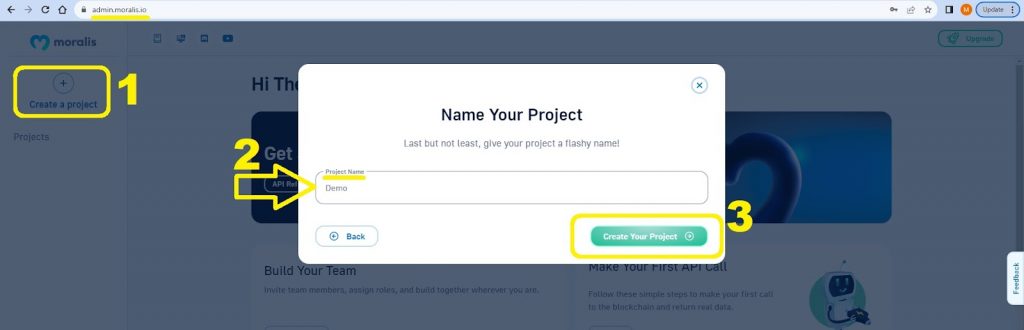
Log in to your Moralis account. If you don’t have an active account yet, create your new Moralis account now (it’s free). Once inside your Moralis admin area, hit the “Create a project” button, name your project, and finalize this step by clicking on the “Create Your Project” button:
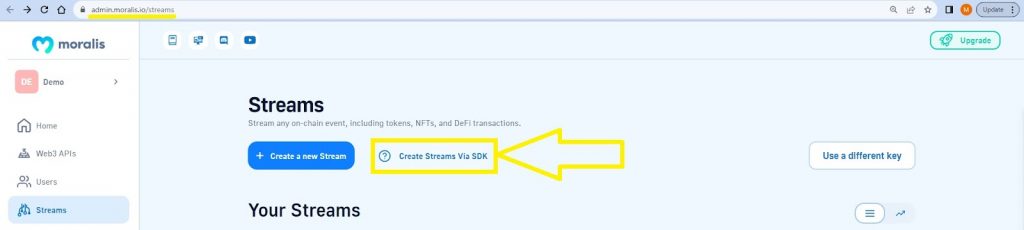
Among many options for your project, you’ll also see “Streams” in the left-hand side menu. Select that option as indicated in the image below:
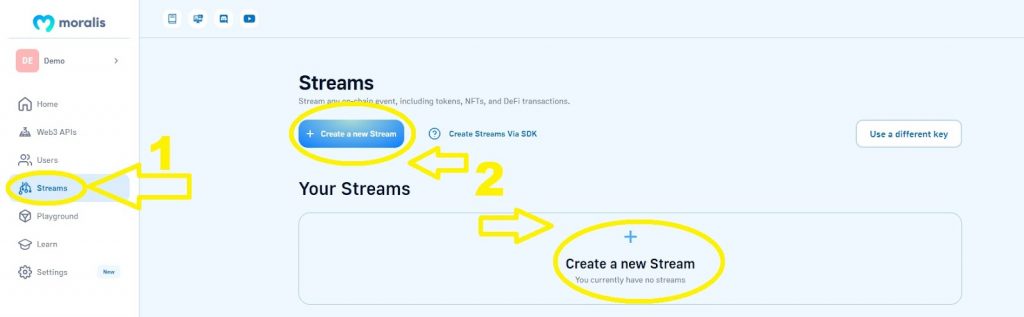
Once on the Streams page, you’ll see two options to create a new stream. Click on either of them to move forward.Set up a custom stream or select one of the available templates. In either case, you must provide your stream with a wallet address or a smart contract address you want to monitor. In the case of creating NFT sales notifications, you will most likely want to focus on specific NFT collections. Hence, you will want to enter NFT smart contract addresses. In case you wish to use the templates, focus on the “Whenever a NFT ERC-721 is transferred” and “Whenever and ERC-1155 token is transferred” options:
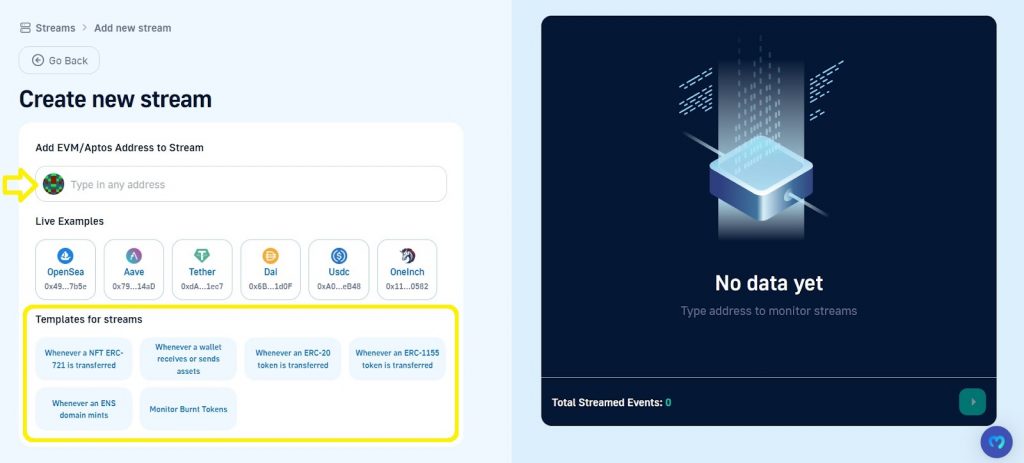
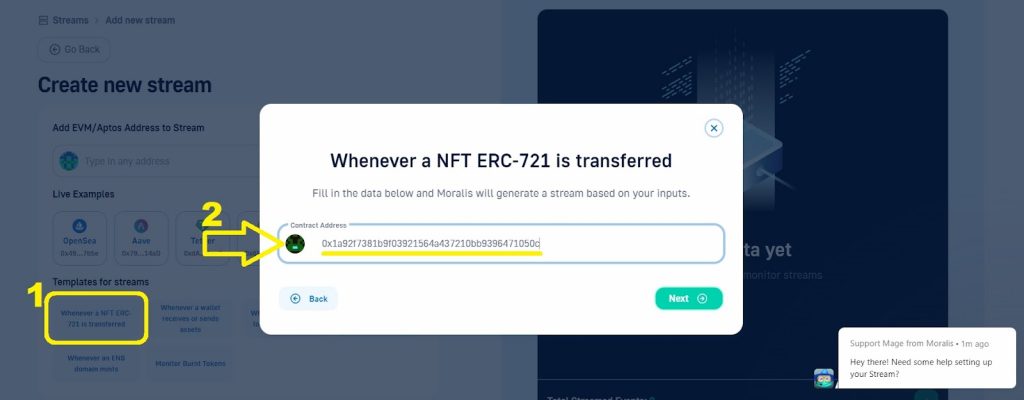
For the purpose of our example using the Cool Cats NFT collection, we can select the “Whenever a NFT ERC-721 is transferred” template and enter the collection’s smart contract address:
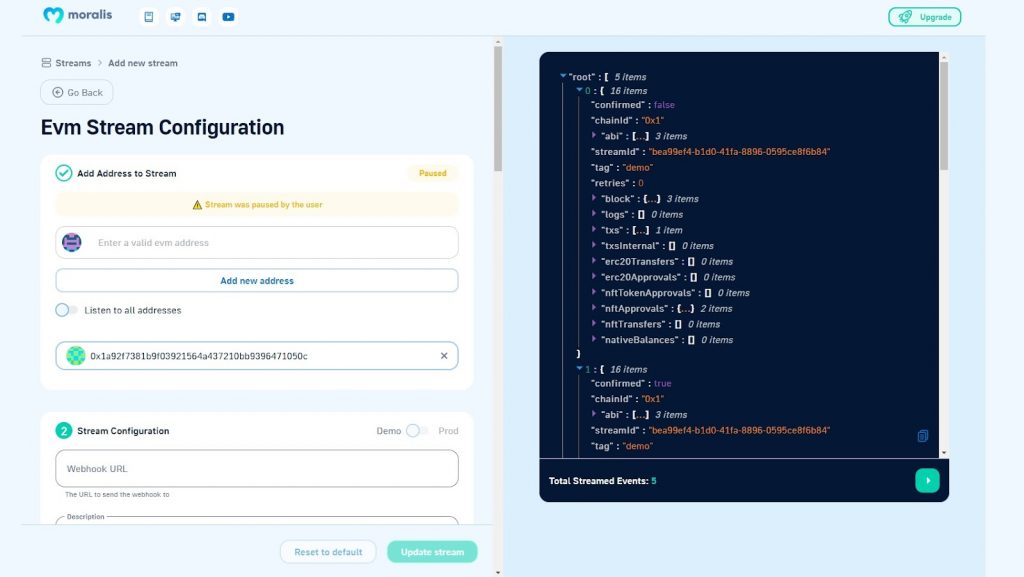
Whichever path you take, once you enter a blockchain address, you’ll be able to run the stream for it in a demo version. Here’s what the results look like for our example (focus on the right part of the screenshot):
Stream Configuration
Looking at the left-hand side of the above image, you can also see the stream’s configuration options. This is where you can add more blockchain addresses to monitor for your NFT sales notifications purposes or any other Web3 alerts agenda.
Refer to the Streams API documentation mentioned above for all the details regarding these configuration options. However, to give you a test of it, we offer a quick overview of the available options below.
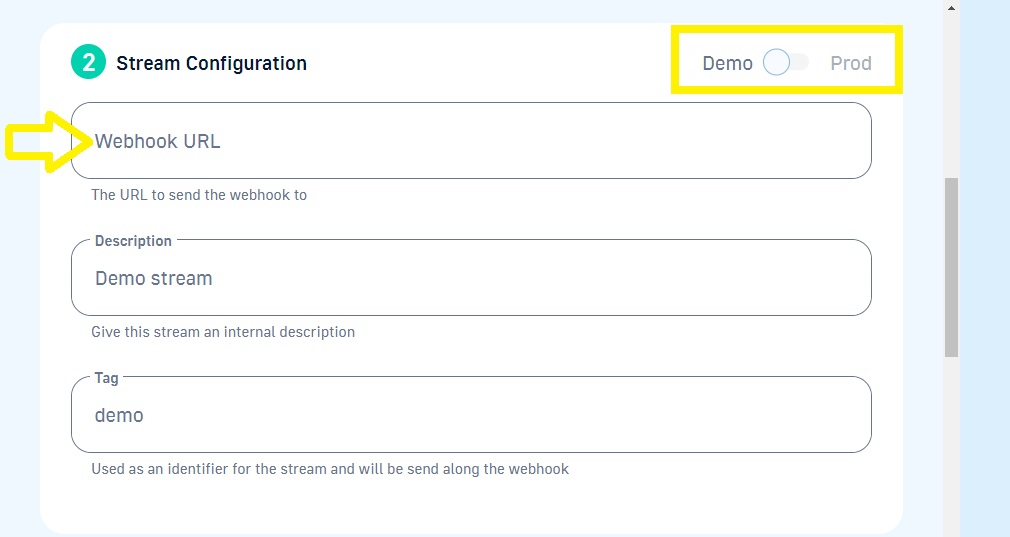
The second set of options allows you to toggle between the demonstration (“Demo”) and production (“Prod”) modes, set your custom webhook URL, and enter your stream’s description and tag:
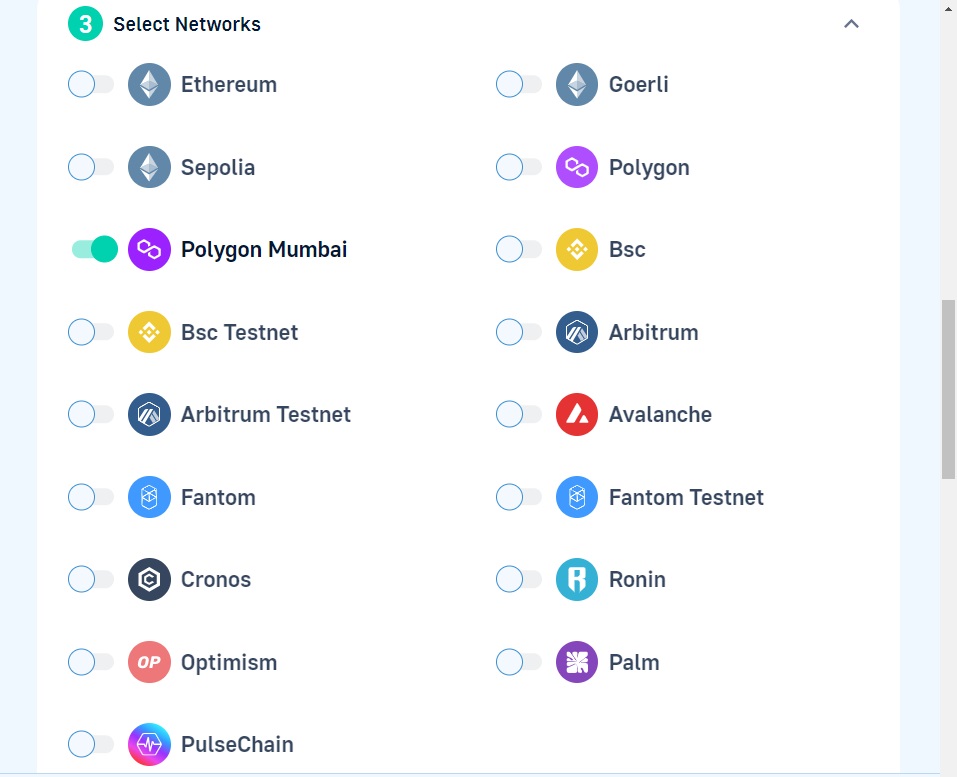
The third step allows you to select the networks you want to focus on:
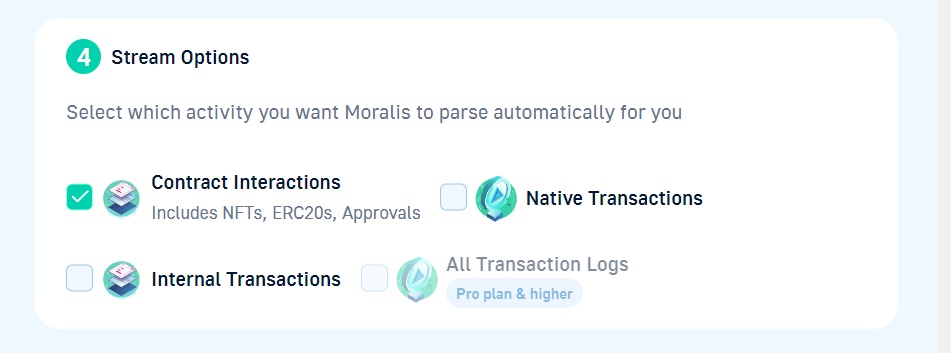
Next, you have a chance to select what kind of on-chain activity you wish to focus on:
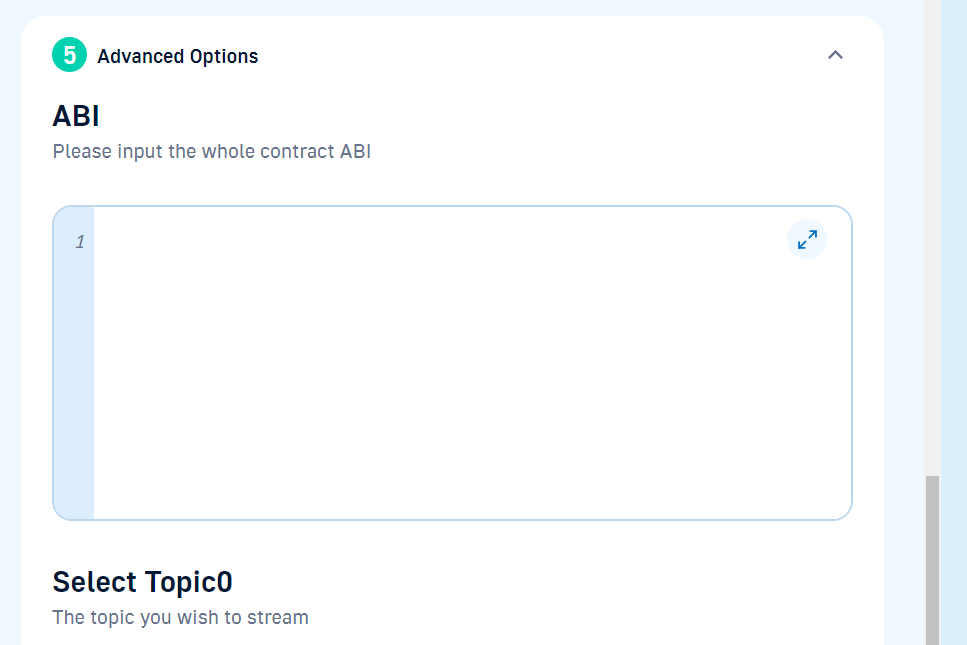
Under advanced options, you get to input the smart contract’s ABI, specific topics, and filters:
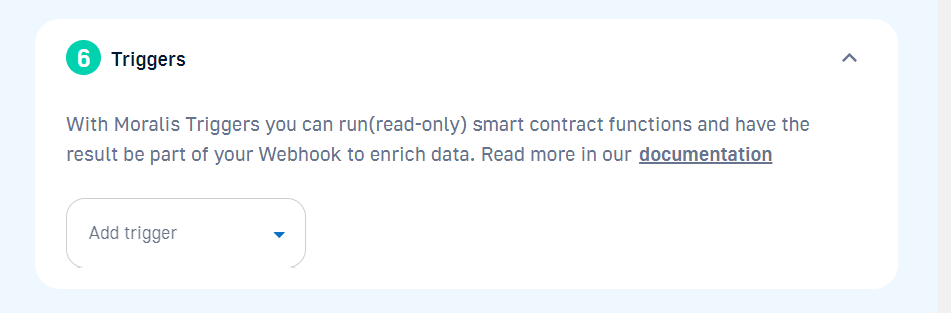
Last but not least, you can also choose Moralis triggers. They allow you to run the smart contract’s read-only functions:
Use Cases for NFT Sales Notifications
Any dapp incorporating NFTs could potentially benefit from using NFT sales notifications. However, the two most typical and common use cases are for an NFT marketplace and an NFT portfolio tracker. By combining the power of Moralis Streams and the NFT API, you can easily create these types of dapps.
For example, if you were to focus on building the next big NFT marketplace, you’d definitely want to track NFT trades by marketplace. As such, you’d want to utilize the power of the getNFTTrades NFT API endpoint. And, if you want to build a killer portfolio tracker, you’ll want to fetch NFTs by wallet or collection. In that case, make sure to take a closer look at the getContractNFTs and getWalletNFTs endpoints.

NFT Sales Notifications – Summary
We first covered the basics of NFT sales and notifications. As such, you now know that creation, listing, purchase, and ownership transfer are the four phases of NFT sales. You also learned about several other popular “NFT sales notification” alternatives. These include bid notifications, airdrops and releases alerts, price change alerts, and community updates.
Next, we explained that the process of setting up any on-chain notifications, including for NFT sales, boils down to the following two steps:
Detecting an on-chain event.Fetching the details related to that event.
You now know that Moralis’ Streams and Web3 APIs help you cover both these steps without breaking a sweat or the bank. So, to set up NFT sales notifications the easy way, you’d use Streams to detect the sale and NFT API to obtain all sorts of detailed real-time, on-chain data. Make sure to access these powerful tools with a free Moralis account!
Nonetheless, we even demonstrated how to set up a specific stream that monitors an NFT collection. We did so via the Moralis JS SDK as well as the admin UI. Last but not least, we also explained that while a wide range of dapps may benefit from NFT sales notifications, NFT marketplaces, and portfolio trackers are the two most common use cases.